Review management for florists
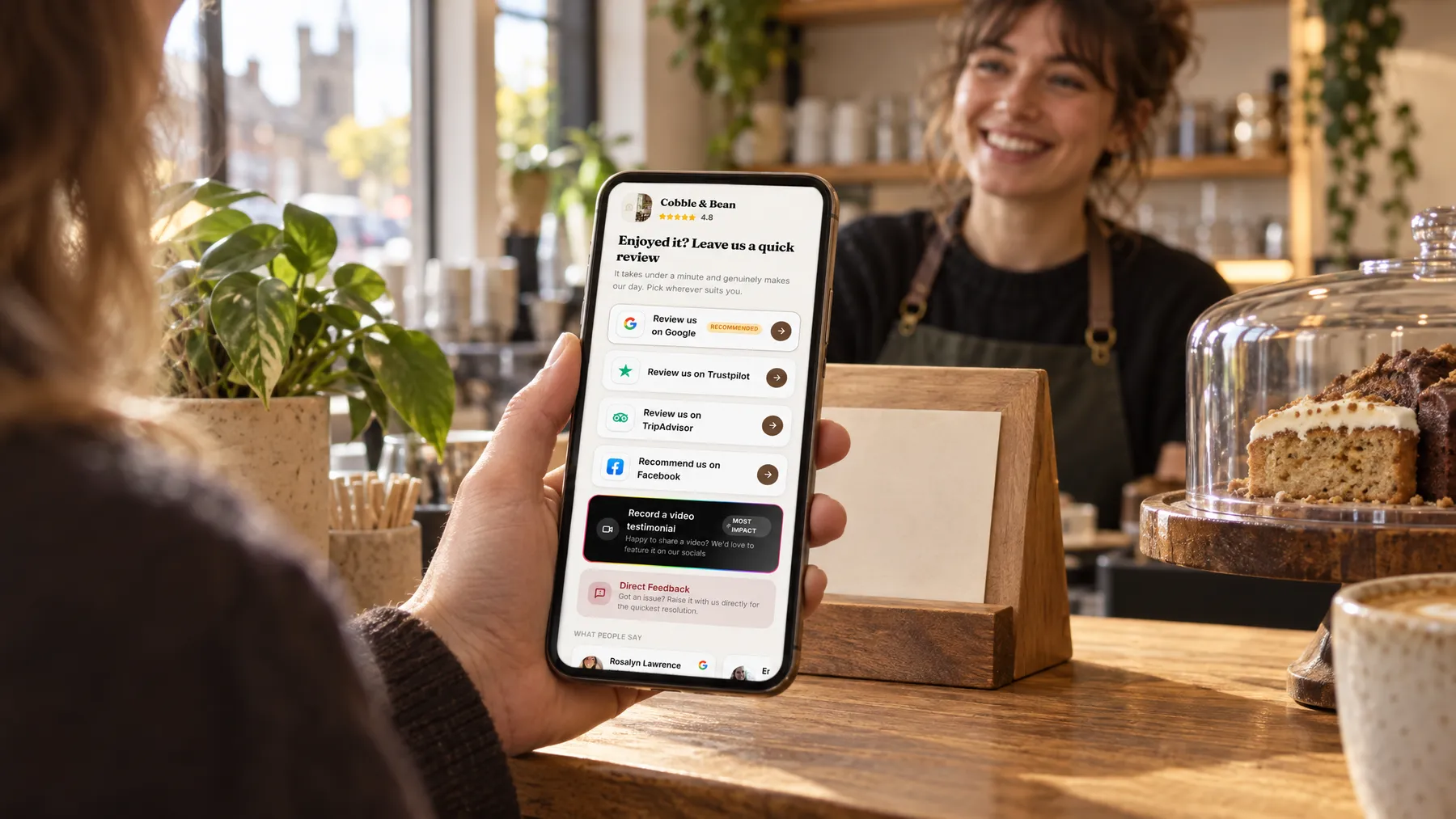
The person who orders flowers often never sees them arrive, and the person who receives them rarely writes a review. LocalQuiver closes that gap with a friendly text or email to the buyer, a gentle follow-up, and a branded review page that opens Google’s review box in a tap.

Asked politely. Followed up for you.
- Review request Text or email, after the visit
- Friendly reminder A couple of days later
- Taps through to review Follow-ups stop by themselves
How it works for florists
Ask the person who paid
Send a request by text or email to the customer who placed the order, with their first name and the date filled in from your template. Texts arrive from your shop’s name, and emails come in your branding, or from your own mailbox if you prefer.
A follow-up, not a chase
If they haven’t tapped through, up to two gentle follow-ups go out on the timing you set. The sequence stops by itself once they tap through to a review site, so nobody who has already clicked gets asked again.
Codes for the counter and cards
Print a named QR code for the counter, the window and the little card tucked into each bouquet, as PNG or SVG. Each code shows its own opens and review-button taps, so you can see which ones people actually use.
Video thank-yous from couples
Couples can record a short video testimonial on their own phone from your review page, or upload one, with a consent box ticked. It lands in your inbox to play and download, so you can keep it and use it however you like.
Our wedding flowers were even more beautiful than we imagined.
Wedding season at Fennel & Foxtail
A bride’s thank-you, finally on Google
Nadia does a wedding most weekends through the summer at Fennel & Foxtail, and couples always messaged her lovely thank-yous that nobody else ever saw. Now, two days after each wedding, a text goes out with the couple’s first name and the date from her template. One bride tapped through on the way home from her honeymoon and left a long Google review about the peonies. Nadia read it in her inbox the same afternoon.
An illustration of how it works, not a real customer.
The film
Customers scan a QR code or tap one of our tap cards to reach a branded review page, get a friendly text or email with gentle follow-ups, can choose to give private feedback as an extra option, and every review lands in one inbox. It works the same way for florists.
Read the transcript
0:02You do great work, every single day. But reviews only come in when someone remembers to ask.
0:09Customers can leave a review in seconds. They scan your QR code, or simply tap their phone on one of our tap cards.
0:16It opens your branded review page, with Google marked as recommended, plus Facebook, Tripadvisor, Trustpilot and Checkatrade, in the order you choose.
0:26After every job or visit, a friendly text or email asks for a review, then gently follows up, so you never have to chase.
0:34And if something wasn't quite right, customers can choose to tell you privately. It's an extra option, and everyone still sees the same public review buttons.
0:43Every review then lands in one inbox, with private feedback alongside, so you can stop logging in to five different sites.
0:51More five-star reviews, without the chasing. Because every fresh review gives someone nearby one more reason to choose you.
0:59LocalQuiver. Your marketing, sorted.
Open “Review management with LocalQuiver” on its own page →Browse all our films →
What's included
- Texts and emails asking for a review, in your shop’s branding
- Templates with merge tags, a live preview and a test send
- Up to two gentle follow-ups, stopping once they tap through
- Named QR codes for the counter, window and bouquet cards
- Google, Facebook and Trustpilot reviews in one inbox
- Video testimonials from couples, ready to play and download
- A private feedback option alongside the public review buttons
More for florists

Questions
Yes. Pop a QR code onto the card in each bouquet and the person who receives the flowers can open your review page too. The buyer still gets your text or email, so both sides of the order have an easy way to say thank you.
Yes. Review emails carry your logo and colours, and can be sent through your own mailbox so replies come straight back to you. You write the template, with merge tags for first names and dates, and can send a test to yourself before anything goes out.
Yes. Paste your Trustpilot page link and those reviews are read into your inbox once a day, alongside Facebook. Google reviews are checked every hour, including any photos customers add of the flowers they received, so you see the whole picture in one place.
Review management
Book a free chat and we'll show you how it would work for your florist, set up and running for you.